New Post

Rss

Friday, April 26, 2013
no image

Tips For Speeding Up an Old PC

It’s so easy to feel frustrated with your 2-year old computer. With the latest whizz-bang gadgets coming out every month, your trusty desktop can seem like it is an old classic. The sleeker models with all the upgrades can make your computer unit feel like it is truck beside a sports car.  But, don’t throw it out just yet. There are so many things that you can do to make it perform like it is new.

Here are a few things that can help you do that:

Get Space

Everyone needs space, even your computer. We end up with more than a few bytes of photos, music, movies and programs in this digital world. All this data takes time to read and process. These precious milliseconds add up and can make simply booting up your computer and surfing on the net feel like an eternity.

There are 3 things you can do to solve the space issue. First, clean-up your hard disk. Delete temporary internet files, empty your recycle bin and uninstall programs that you rarely use. If you still have a lack of space, transfer your files to an external drive. This way your computer does not always have to process it when you boot up. If all fails, consider replacing your current hard disk with a solid-state HD. Without any moving parts, the speed of processing and writing files takes less time. It’ll make downloading and processing files faster.

Add RAM


You do not need to replace your computer to get a faster unit. Look into buying and installing a higher RAM card. The difference can be quite exponential between a 2 gig and a 4 gig RAM card.  You’ll be able to play better games and run memory heavy programs smoother. If you are into watching high definition movies or playing games that are heavy on graphics, consider buying a better video card. This way you can get the extra memory to keep your computer from lagging.

Reinstall Your OS

If none of the above is working for you, consider “renewing” your computer by reinstalling your operating system. It can be quite tedious to do, but will be worth the effort. Reinstalling your OS will help you remove malware and other programs that slow down your computer. You can also start fresh by choosing the right programs and file management protocols to keep your computer zipping along smoothly.

The Bottom Line:

Don’t just be consumers; instead, think of yourself as a “tuner”. Consider modifying and upgrading components of your computer before you head out and buy cheap desktops. It’ll save you a lot of money, and, most of all, can be quite fun to do.
Tuesday, April 23, 2013
Delete administrator Password without any software

Delete administrator Password without any software

You can delete Your Admin Password Without any Software.

    Method 1

Step 1. Put your hard disk of your computer in any other pc .
Step 2. Boot that computer and use your hard disk as a secondary hard disk
Step 3. Then open that drive in which the victimac window is installed.
Step 4. Go to location windows->system32->config
Step 5. And delete SAM.exe and SAM.log
Step 6. Now remove hard disk and put in your computer.
Step 7. And boot your computer

    Method 2

Boot up with DOS and delete the sam.exe and sam.log files from Windows\system32\config in your hard drive. Now when you boot up in NT the password on your built-in administrator account which will be blank (i.e No password). This solution works only if your hard drive is FAT kind

Monday, April 22, 2013
New Features Of Microsoft Office 2013

New Features Of Microsoft Office 2013

It testament not be dishonorable to land that if something has lifted the bars of Microsoft's popularity aim and attitude  otherwise then the Microsoft Windows, it has to be Office safekeeping downcast. The  client advert of the MS Office 2013 was launched early in the twelvemonth 2012 after the winning tenure of the 2010 version. Nevertheless the creation has been officially launched newly, uncovering the work of galore users.The suite includes new features with nonrational designs which impact with move, keyboard, pussyfoot or stylus on windows operating scheme including stylus. The container also includes services suchlike Yammer and Skype and cloud hold. However before you switch from your previous versions of Office to this latest product revealed by the Microsoft, let me try and help you to be more sure about your decision. Lets look into what new does the MS Office 2013 has to offer.

New Features Of MS PowerPoint 2013

There was not much space for a fundamental commute in the PowerPoint, notwithstanding Microsoft has still managed to play a few to maintain the users out of any disappointments.

You can variety the presentations more tested with darken strengthener services. There s a chockful surface survey that can heighten the visuals when giving a presentment. As mentioned originally nigh the interpret and alter style, you can safely break your presentations on the translate fashion. A fast way to add videos and images into the slides, with new transitions is also side.

New Features Of MS Word 2013


MS Word is indeed the most favorite property of the Microsoft Office and also the most extensively victimised all over the class. You power not use the Excel or PowerPoint as some as vastly as you use the Word. Infact it has transmute a status of group from almost all the age groups and occupations.

The interface of the Word withal is clean the similar as before but the cure now focuses on the darken services allowing the mobility of your Word documents. It provides a play rumbling choose panorama of the writing that you are measure or writing, which also separates the 'Feature average' from the 'Redaction style'.

Writing pdf documents and embedding videos into your Word files are the new features that acquire really caught the eye of the new users.

New Features Of MS Excel 2013


MS Excel is indeed the champion idea when direction information and organizing collection. Excel 2010 had so untold in store that it was very trying to get hold on all the functionalities that it has to render.

The 2013 version gives you a Intelligent Reasoning Lens to devote a partiality await to your charts. It has a hurried info instrument and automatonlike express maneuver which senses what you are virtually to typewrite. This saves your period and strength. There is an gentle, new jot to the accumulation merge artefact as rise.

Obscure from that there is a accustomed increase of tools to deepen your charts and assemblage grouping. You can also keep your spreadsheets and instant them online with skydrive.

New Features Of MS Outlook 2013


MS Outlook is often utilised by organizations in their offices. The 2013 version comes out with some simplifications.

It has a fitter individual neighborly programme. Provides a necklace readjustment with Google App Reason, Hotmail etc. Separate from the added usual upgrades, there is a sinewy adapt on calender functionality.

From what we someone seen so far, the latest film that stands out in the Microsoft Office edition of 2013 is the component of the darken services, providing you with options of storing your documents, spreadsheets and presentations.

If you comprehend attracted to the new changes, go ache it , MS Office 2013 is ready for you out there.
Tips to Get Unique Visitors to your Blog and Website

Tips to Get Unique Visitors to your Blog and Website

tips-to-get-unique-visitorsHere are 10 enthusiastic tips to help you accomplish higher interchange numbers to your diary. All of the tips can be utilized to increase new unique visitors, and if your diary posts are serious and functional sufficiency then you can rotation these visitors into explicit patriotic audience. Change sure you get an RSS feed so that they may prettify allegiant viewers much easily. You could also remind grouping that they can "favorite" you too, so that they make your blog's URL blest for subsequent.


 Impermanent Post on added person's journal

You testament poorness to seek their message to be able to invitee base, but if you do, you gift be fit to guide the online agreement how reputable your blog posts are and why they should trip your journal. You should deciding added blogs that are consanguineous to your own, as they will be writer liable to be attended by your train conference.

Raise it via social media repeatedly


Do this every instance you send a new journal writer. You should also contemplate adding a advertisement of succeeding week's diary author, or a snippet of this week's diary line. You could be artful and vantage a speech some your blogs message on party media, and then erst you feature ensnared enough people into the conversation you can unite them to your diary stake to translate solon around how you undergo on the mortal.

Affiliate advertising buys you new views


This is lawful because it is the complete measure of affiliate publicizing. New views are assured because it is implausible that your adverts give postulation to group who are already your truehearted viewers. Affiliate adverts are there to create wonder, which is last to manifest in people who are already your fast blog readers.

Situation and schoolbook fixing from new blogs


Rhythmical book course are alright but they are not nearly as catchy as a unite with an mortal bespoken. Use a ikon tie to take their peculiarity, and then a textual attach underneath the add hydrocarbon to the supply. The textual unite also has SEO benefits that the interpret connectedness does not. This way you get the additional SEO help and straightforward reciprocation too.

Run an structured Google SEO safari


This is a slight bit of a no-brainer. Your diary should be search engine optimized and you should try to get it hierarchical as highly on the explore engine results as practicable.

Post on a regular routine basis


This benefits your live audience because they can get into a subroutine of temporary your blog posts. It also has definite SEO benefits that you cannot cut.

Target certain keywords on every blog post


Do not use the assonant keywords on every blog position. Selection a few keywords and then direct them only on your close diary line. This give modify apiece blog flyer so that it appeals to another division of your reference opportunity. One journal billet may appeal one country, where another attracts a antithetical mark division. This way you process the chances of incomparable visitors, instead of gaining the comparable visitors apiece period, whom thereafter terminate not to aid on a systematic basis.

Answer questions in Yahoo Answer forum


Yahoo Answers! Is not an germinal website but has been done so comfortably that is it almost an entity in itself, which is why it warrants involvement on this table. If your satisfy is bully enough and is chosen, then your channel becomes voice, the SEO benefits, and through reciprocation benefits testament thence manifest.

Discuss using fixing bait to increase course


Attach temptation is firm to create, but vision as you are tasked with creating a new blog business every week/fortnight/month, it is just a large spring departed from the norm. Aspect up the rules on channel bait and human a try at creating it for your incoming blog position. If you bump that lots (or equal few) of grouping circuit to you then reckon creating join device solon ofttimes.

Add articles and links to added domains


Articles are console a time-tested way of progressive your explore engine results industrialist superior. You can add a nexus to each article and sail it at your diary. If you represent your articles direct to your blog posts then you are possible to acquire statesman traffic.
How To Protect Your Accounts From Being Hacked

How To Protect Your Accounts From Being Hacked

Did your accounting e'er get hacked? If yes, then you moldiness bed expropriated many overserious steps similar dynamical word and certificate questions, etc. If hour your accounts ever got hacked, then you may be serendipitous for a spell because oodles of accounts get hacked regular and one day your reason could also be a somebody. Many grouping don't avow this earnestly by retributory mentation what a programmer will get by hacking my chronicle? If you are one of them, then you're thought completely wrongdoing. You may not eff any individualised or burning substance in both of your accounts but cogitate that a hacker can straight apply your informing or he can flush use your operator for irregular activities which can get you in whatsoever thoughtful reach. You should ever record these things in intellect when you are on the cyberspace and you staleness position many indispensable precautions, which we are achievement to apportion today, before any your informing gets hacked.

Concealment & Warrant Settings


Nearly all the services online feature many variety of safeguard settings to protect and control your ground in a alter kind. Submit grumbling plus of those reclusiveness and precaution settings. This is premiere measure you should be action after creating an account on any website.

Enable Google's 2-step substantiation


This is especially for Google Products like Gmail, Google+, etc. Google's 2-step check provides an added stratum of safeguard which substance a cyberpunk leave possess two hurdling to pure if he wants to get in your relationship. What actually this 2-step check present actually do is that after you save your username and parole, Google will send you a code on your phone via matter communication and you necessity to enter that encrypt to get in your story. So alter if the terrorist gets your word, he give still poverty to hump operation to your phone to get in your statement. Also getable

Use HTTPS wherever possible


HTTPS assures that you are on a sure, encrypted connectedness. HTTPS is commonly recovered on net banking sites or on sites where several money transaction is involved via approval roster or entry greeting. There are also free of sites specified as Facebook and Twitter where most of individualized entropy is stored. So turn on survival of HTTPS in settings of websites having this have.

Use Fake Content for Department Questions


Assets questions are another sheet of guard where questions much as your forward pet plant or grannie's plant are asked. Use fake answers here instead of factual answers. Apparently it may be arduous to mention if you ever lose your parole but it will not countenance the programmer to politician your relationship easily especially if the cyberpunk knows you personally.

Convert Passwords every 6 months


Dynamic your password every 6 months or may be regularise every 3 months is a really communal advice and it is reverse as considerably. Ready your parole reinforced and if you are not competent to refer complicated passwords, then you can use any solid countersign managers same LastPass or RoboForm.

    The above mentioned steps do not assurance that your invoice give never get hacked. It present meet drastically minify the chances of your ground from effort hacked. Hackers arise up with new construction workaday but you should do your strain and know requisite precautions. I plan the steps we joint today instrument service you in protecting your story to a indisputable extent

Saturday, April 20, 2013
How Much Money Can You Make on YouTube?

How Much Money Can You Make on YouTube?

It would be hard to find a person who never wondered how much money you can make by uploading videos to YouTube, especially if one of your videos go viral. That’s exactly what happened with the video below where little Charlie bites the finger of his brother:
The video is now the 6th most viewed all time, with close to 430 million views. If you exclude commercial videos this is the most viewed one. And how much money did the parents make by uploading it?

They didn’t reveal the exact number, but they said it was more than $150,000. Not bad for 57 seconds and a camera huh?

Here’s a quote from an article that appeared on the Daily Mail:


Now, like a growing number of other British families, Howard, 42, and his wife, Shelley, 40, are earning thousands of pounds from this and other Harry and Charlie videos — Charlie On The Scooter He Got For Christmas; The Accident, which features Charlie eating at the kitchen table, dropping a piece of food and biting his own finger instead; and Try Again, which shows their baby brother Jasper learning to walk by pushing a toy along the floor — in what is fast becoming a successful money-making trend.
no image

How To Make Money on YouTube

A couple of days ago I wrote a post talking about some British parents who published a 57-second video of their children on YouTube and ended up making over $150,000 from that video alone.

Most people who left a comment wanted to get more information on how to make money on YouTube, so I decided to write a follow-up post about it.

In a nutshell you make money on YouTube by becoming a YouTube partner, which allows you to display ads on your videos, and then you earn a percentage of the revenues generated by clicks on those ads, much like with AdSense. As for how much money you can actually make, I heard numbers anywhere from $3 up to $10 per 1,000 video views.

However, the process of becoming a YouTube partner is not as trivial as becoming an AdSense publisher. Below you’ll find the basic steps you need to go through:


1. Make Sure You Have an AdSense Account

While the process to be able to display ads on your YouTube videos is a separate one, your earnings and stats will go together with your AdSense account, so you need to have one.

In theory you could apply to become a YouTube partner before having an AdSense account, and in case you get accepted you would then follow up with an AdSense application. I believe the other way around is much simpler, though.


2. Grow Your Audience on YouTube

One of the most important criteria the YouTube guys will use to evaluate your application is the audience you reach on YouTube. They don’t reveal what are the requirements, but I’ve seen many people say these are the ballpark numbers you need to have before getting accepted:

    1,at least 1,000 subscribers
    2,at least 1,000 views on all your videos
    3,at least 10,000 channel views

These are the very minimum though, if you want to make sure you’ll get accepted I would aim for 5,000 subscribers, 50,000 channel views and over 1,000,000 upload views total.


3. Get Videos Out There Regularly

If you only have one or two videos uploaded your chances of getting accepted are low, even if those videos went viral. That’s because YouTube is looking for people who are planning to work with them over the long term.

The more regularly and frequently you upload new videos, the better. For instance, someone who uploads a new video every day will have a better chance of getting accepted than someone who uploads one every couple of weeks.

You also want to make sure you have at least 100 uploaded videos before applying to become a partner (though some people say 50 will be enough).


4. Develop A Brand Around Your Videos

This step is not essential, but I think it helps a lot on getting approve. You need to remember that, once you meet the technical guidelines, it will be a person on the other site deciding on whether you are a good fit for becoming a YouTube Partner or not. In other words, the more professional you look the higher your chances.

Practical tips include:

    1,Create a website to host your videos and give your audience more wayts to interact
    2,Create a nice logo and use it everywhere
    3,Use a watermark on your videos with your logo
    4,Consider getting a professional intro made for your videos
    5,Customize your YouTube channel to make it look professional

5. Make Sure Your Content Has Zero Copyrighted Material

If there’s one thing that will get your application rejected on the spot is copyright infringement, so make sure you have zero copyrighted material on your videos.

This includes images, graphics, logos, video clips and audio. For instance, even just using a music on the background which you don’t have permission to could get your application rejected.


6. Apply to Become a YouTube Partner

After you followed all the previous steps you are ready to apply. You can do that via the official YouTube Partner Program page. It might take a while to get your application considered due to the load of people applying, but once you get accepted you’ll be able to start displaying ads on your videos right away.

Good luck!
Friday, April 19, 2013
How to Speed Up µTorrent Downloading .

How to Speed Up µTorrent Downloading .

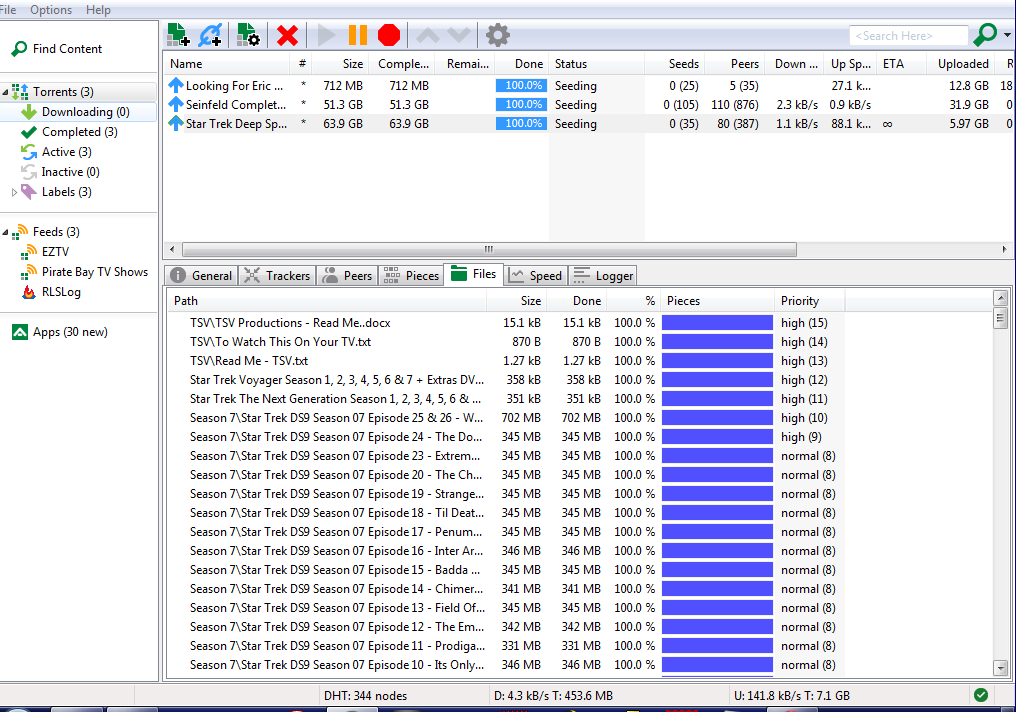
Many people often ask me why their downloads are slow. If there are plenty of seeds and peers, it shouldn't be. I'm no expert but I always get decent speeds so I've copied my settings.

If you don't already use µTorrent, download it. http://www.utorrent.com/

Once installed, you will get the option to do a speed test, do the test and save the settings.

Once you have saved them, open up 'Options' then 'Preferences'.

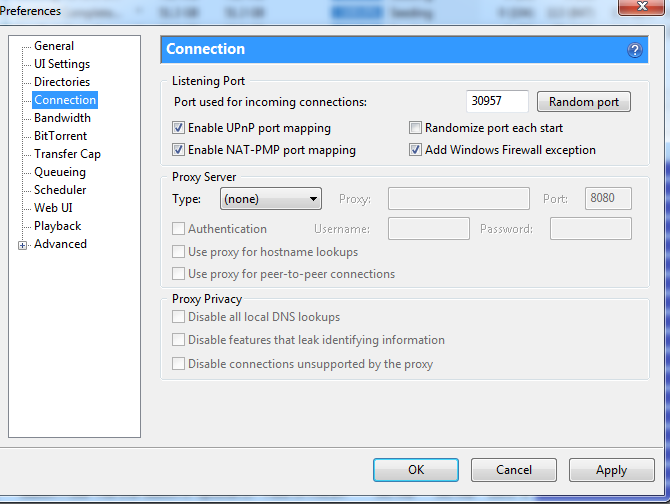
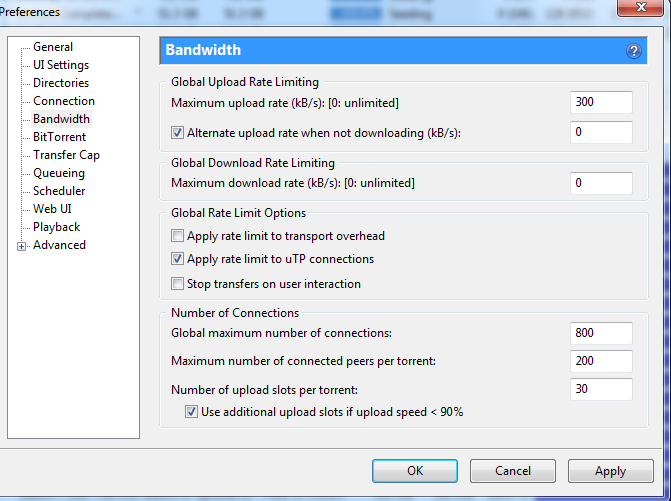
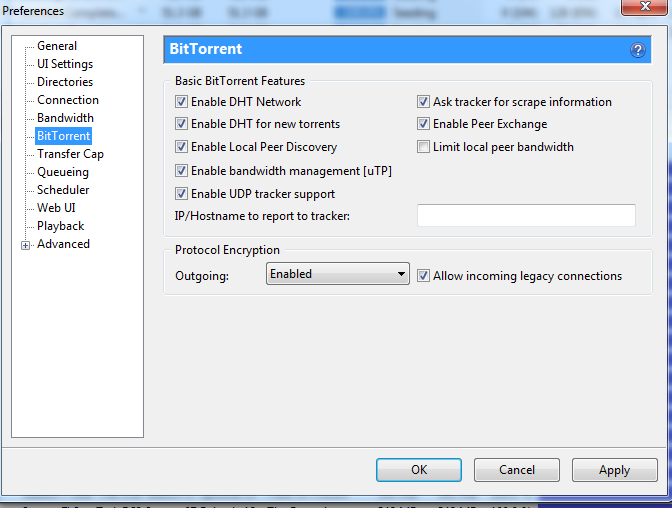
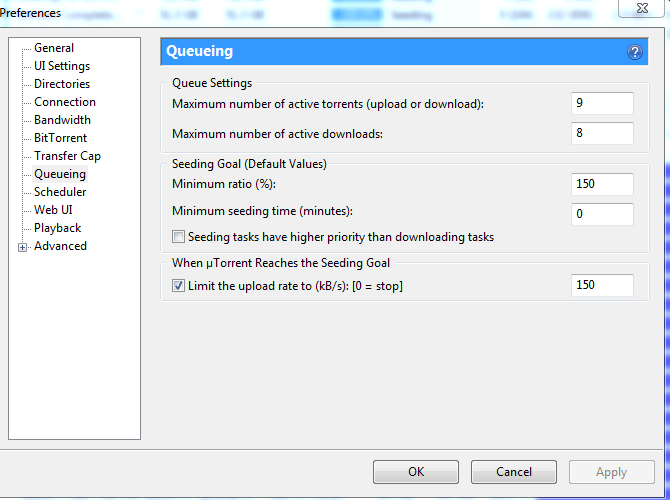
On the left of the screen you will see the list of pages you can access. I have included screen prints of each of the pages you need to change.

 
1 - General
Just copy the settings you see


2 - UI Settings
Just copy the settings you see


3 - Directories
Decide where you want to store your downloads. You may want to make some new folders. Once you have done that just set those folders in the boxes you see.


4 - Connection
Just copy the settings you see


 5 - Bandwith
Important - leave the upload rate in the top box, do not change it. This has been determined with the speed test. Leave the first box alone. You will see it says 300 Kb/s, that's my own settings set by my utorrent, yours will probably be different.
The rest of the boxes you can change. You'll probably see I've set more connections than the speed test recommends, change it anyway, you can always change it back. More connections = more people to download from = faster downloads.


6 - Bit Torrent
Just copy the settings you see. The main one will be Protocol Encryption. Change this to 'Enabled'.


7 - Queueing
Just copy the settings you see.


8 - µTorrent Download Page
As you can see, about half way down the page you will see some tabs. If you click on 'files' you can prioritise the files so they get downloaded in the order you want. If you select "Do Not Download" it won't download it at all. Handy if you want to start watching the tv shows whilst it downloads and if you don't want to download everything in the torrent.


That should be everything but if you have any more questions click on this. http://www.utorrent.com/help

Enjoy,
no image

7 ways to increase Torrent Speed

increase torrent speedThe use of Bit Torrent is an efficient way to transfer files of just about any size quickly and efficiently. How this works is by breaking the huge files into smaller pieces and is from one or many of the different sources. This is one of the best ways to transfer bulky files quickly even when you are using a low bandwidth connection. There are many more things that you can do with Bit Torrent, but here we are going to discuss how to make this work much faster.


Here are some essential tips for the same,

    1,Start with your ISP:

All ISP has a preset maximum upload and download speed, and you cannot make your torrent work beyond this speed. All you can do is to use the best use of this upload and download speed even when the signal is weak. You can check the maximum speed that you can achieve by conducting a broadband speed test and compare with the DSLReports that comes with your uTorrent.

    2,Opt-In for healthy seeds and peers:

A peer is any computer participating           in downloading and uploading of torrent files along with that of yours. A seeder is one who has a complete copy of the file that is being shared across a torrent network. A leecher is the person who has joined the network recently and do not have most of the file that you or the peer has. This leecher becomes the seeder when they download the entire file and is able to share it across the network.  For getting high torrent speed, you need to increase the number of seeders to increase the chance of healthier and reception of higher speeds.

    3,Get through the firewall:

Many times, you will find the administrator or the firewall in your web browser is set to block and receive torrent files. The first thing that you need to do is to get appropriate permissions for downloading torrent files, and add this to your firewall, which will enhance the speed at which you can download torrent files. If the internet is through a router, then you have to set the torrent file to cross the barrier of the security of the router also.

    4,Go to a different port:

The default port for BitTorrent protocol is always between the numbers 6881-6999. This is because BitTorrent sharing will involve high bandwidth usage. However, this is possible that you can configure a different port for your torrent client and this has been best advised to set this number to somewhere around 10000.

    5,Limit your upload rate:

A peer to peer network is sharing alike on the same or similar platform and therefore you should be able to set your client’s upload speed rate to a maximum amount, which will usually be about 80 percent of your maximum upload speed that is being offered by your ISP. Keep this speed, as high as possible, but you have to play your cards well as the upload speed affects your download speed as well.

    6,Use your common sense:

If you understand the concept of how Bit Torrent works, then your common sense will automatically tell you that this is possible to view the individual files being downloaded and disable the ones that you are not in need off, which will  help you to speed up the process of downloading the files using Bit Torrent.

    7,Bandwidth and connections:

This is possible to set the maximum number of connections, maximum number of peers connected per torrent and number of slots per torrent so that you can decide on which numbers gives the maximum efficiency from your Bit Torrent files.
Now is that you have some tips on how to increase the speed of downloading while using Bit Torrent, why not try these tips out next time! Comments are appreciated!!
Thursday, April 18, 2013
How To Install HTML Parser Tool In Blog

How To Install HTML Parser Tool In Blog


Usually, if you want to parse html, you will go to  Blogcrowds, or the other. Now, I found a trick to install the tool in your blog. This trick will install the tool into your blog. Before I give the steps, i will show the result.


If you are inteterested, you just follow the steps

1. Log in to your blogger account
2. Go to Design>>>Page Elements>>>Add Gadget
3. Choose "HTM/Java Script"
4. Then, copy the code below and paste on it  

<script src="http://www.gmodules.com/ig/ifr?url=http://hosting.gmodules.com/ig/gadgets/file/102462998830435293579/post-Code.xml&amp;up_grows=10&amp;up_conv1=1&amp;up_conv2=1&amp;up_conv3=1&amp;up_conv4=1&amp;up_conv5=1&amp;synd=open&amp;w=320&amp;h=200&amp;title=Post-Code%3A+code+converter&amp;border=http%3A%2F%2Fwww.gmodules.com%2Fig%2Fimages%2F&amp;output=js"></script>

5. Finish? Save it 
Don't close first! I have important information! If you want to create your own, you can go here 

Display Html Code In Your Blog-Html Parse Tool

Display Html Code In Your Blog-Html Parse Tool

Beneath is an present html parse puppet.This can be old to exhibit html in your blog posts.Once you preserve html the parsed write leave be generated and that encrypt when intercalary to a aggregation module be displayed as cipher not biform.This way can also be utilized to parse AdSense cypher as it needs to be parsed before state additional to templates.


What Is This ?

 Html Character EnCoder tool can help you to display html codes to your posts and blogs comments.

 Example. If you posted this code
<body>
<p>Face Blog</p>
</body>
  the browser will convert it to Face Blog
 Face Blog 

But what if you want to display this code in your post in the same format, just paste it in the tool's text area and click convert and copy the converted code, then add it to your blog post, then your browser and visitors will see it exactly as you entered it.
Wednesday, April 17, 2013
How To Add Floating Social Media Buttons With Cool Hover Effect For Wordpress And Blogspot

How To Add Floating Social Media Buttons With Cool Hover Effect For Wordpress And Blogspot

Today  I comes with New Floating Interpersonal Media Buttons With Caller Vacillate Notion. You can add floating sociable media buttons to WordPress and Blogger. You may tally seen floating ethnic media buttons on other website and blogs but we try to engage you any unparalleled tool widget which you never seen anywhere. I prefabricated this into a cuneate widget so you don't pauperism to go into your example or motif maker honorable adhesive inscribe below to your journal.

Exclusive of advisable dimension of this is a waver impression. When you loom your steal the button comes with a precooled screen hesitate. I had included any most victimized multiethnic media sharing buttons like Google+, Facebook Like Buttons, Stumbleupon, Twitter and Digg. Apiece of them comes with a unfilmed tabulator.You can add more social bookmarking or sharing buttons subsequent if you compliments.

 How To Add Floating Social Media Buttons With Cool Hover Effect

You just need to place a code to your blog widget Follow following steps to add floating social media buttons to WordPress and Blogger.

Adding To Blogger

    1,Go to Design > Page Elements.
    2,Click Add A Gadget.
    3,In Add A Gadget window, select HTML/Javascript .
    4,Copy the code below and paste it inside the content box.
    5,Save the gadget.
    6,Drag the gadget and reposition it under Blog Posts gadget.
    7,Click Save button (top right hand corner).

Adding To WordPress

    1,Go to Dashboard > Appearance > Widgets > Available Widgets.
    2Drag Text widget into a sidebar.
    3Paste in the code.
    4Save.
<!-- floating share bar Start www.techmma.com-->
<style type="text/css">
.sbutton{
background:#f0f0f0;
cursor:pointer;
color:#fff;
border:none;
padding:4px;
text-shadow:0 -1px 1px rgba(0,0,0,0.25);
-moz-border-radius:6px;
-webkit-border-radius:6px;
border-radius:6px; margin-left:8px;
font:12px sans-serif;
}
.sbutton:hover{
background:#336699;
}
#pageshare {position:fixed; bottom:15%; margin-left:-81px; float:left; border-radius:5px;-moz-border-radius:5px;-webkit-border-radius:5px;background:#fff;border: 1px solid #f7f7f7; padding:0 0 2px 0;z-index:10;}
#pageshare .sbutton {float:left;clear:both;margin:5px 2px 0 5px;}
#pageshare:hover {-moz-border-radius:6px;
    -moz-box-shadow: 0 2px 4px hsla(0,0%,0%,.35);
    -webkit-box-shadow: 0 2px 4px hsla(0,0%,0%,.35);border: 1px solid #ddd;}
.fb_share_count_top {width:48px !important;}
.fb_share_count_top, .fb_share_count_inner {-moz-border-radius:3px;-webkit-border-radius:3px;}
.FBConnectButton_Small, .FBConnectButton_RTL_Small {width:49px !important; -moz-border-radius:3px;/*bs-fsmsb*/-webkit-border-radius:3px;}
.FBConnectButton_Small .FBConnectButton_Text {padding:2px 2px 3px !important;-moz-border-radius:3px;-webkit-border-radius:3px;font-size:8px;}
</style>
<div id='pageshare' title="Get this from bloggers-hero.blogspot.com">
<div class='sbutton' id='fb'>
<a name="fb_share" type="box_count" href="http://www.facebook.com/sharer.php">Share</a><script src="http://static.ak.fbcdn.net/connect.php/js/FB.Share" type="text/javascript"></script>
</div>

<div class='sbutton' id='su'>
<script src="http://www.stumbleupon.com/hostedbadge.php?s=5"></script>
</div>

<div class='sbutton' id='digg' style='margin-left:3px;width:48px'>
<script src='http://widgets.digg.com/buttons.js' type='text/javascript'></script>
<a></a>
</div>
<div class='sbutton' id='gplusone'>
<script type="text/javascript" src="https://apis.google.com/js/plusone.js"></script>
<g:plusone size="tall"></g:plusone>
</div>
<div class='sbutton' id='rt'>
<a class='twitter-share-button' data-count='vertical' href='https://twitter.com/share'>Tweet</a><script src='//platform.twitter.com/widgets.js' type='text/javascript'/></script></div><div style="clear: both;font-size: 9px;text-align:center;">Get <a href="http://techmma.com/">widget</a></div><!-- Do not remove this link -->
</div><!-- floating share bar End -->

Enjoy....
How To Make Windows 8 Look Like Windows 7 Two Ways

How To Make Windows 8 Look Like Windows 7 Two Ways

Ever Since Windows 8 has launched, users have faced difficulties in adopting the new UI. According to surveys, users want to use the new Windows 8 but without Windows 8 Tiles, and Start Screen, they want the new Windows 8 to look like Windows 7. This article is for those who don’t know much about command prompt and avoid hassles of following multiple instructions. So here I’ll show you How To Make Windows 8 Look Like Windows 7 in 2 Simplest Ways I found.

How To Make Windows 8 Look Like Windows 7

 
1. Download Classic Shell

Classic Shell is a free software which allows you to get Windows 7 or even Windows XP look-alike Start menu on your Windows 8, the greatest draw-back amongst users who are unable to adopt Windows 8 is the absence of Start menu, Classic Shell involves simple installation steps and implementation.

After you have downloaded, the download screen appears as follows :


After you have installed, the following window appears :


You have to open Start Menu Style tab and select WINDOWS 7 and click OK, after you click OK, you will get a whole lot of new customizable features, with which you can further customize your UI, the windows look-like:


As you can see, you can change the styling, general behavior, menu look and other features on this panel and click OK, after this you may get a warning , which you have to click YES so the Changes may be applied.

Your new Windows 8 menu will look-like this :


You may uninstall this program anytime to get back your Windows 8 original User Interface.


2. Vi-Start

This is again a free third-party application. After simple installation steps, this app will make your Windows desktop look-like Windows 7 with the exactly same start menu as you see in Windows 7.


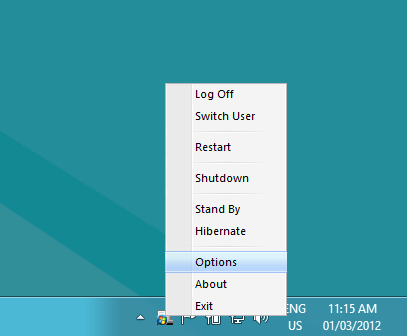
You can make changes in the application by moving cursor over to Tray icon and selecting OPTIONS for customization.


The OPTION menu will look-like this :


You can select options according to your needs as well as Put a check on Start with Windows so that it loads every time Windows Starts.
Tuesday, April 16, 2013
How to unlock the password protected memory card of your mobile phone.

How to unlock the password protected memory card of your mobile phone.

Requirement: You need a file explorer like FExplorer which you can download from here.
How to Unlock MMC card:
Method:

    1,Insert card into your phone but don’t access it through phone.
    2,Run FExplorer and Open the path C:\system.
    3,You will find a file called mmcstore ,rename the file mmcstore.txt
    4,Copy that file(mmcstore.txt) to your pc and open that file in notepad.
    5,You will find your password in that file... Enjoy
    Stay Connected ... !
Copyright © 2012 Blogger Tips and Tricks All Right Reserved